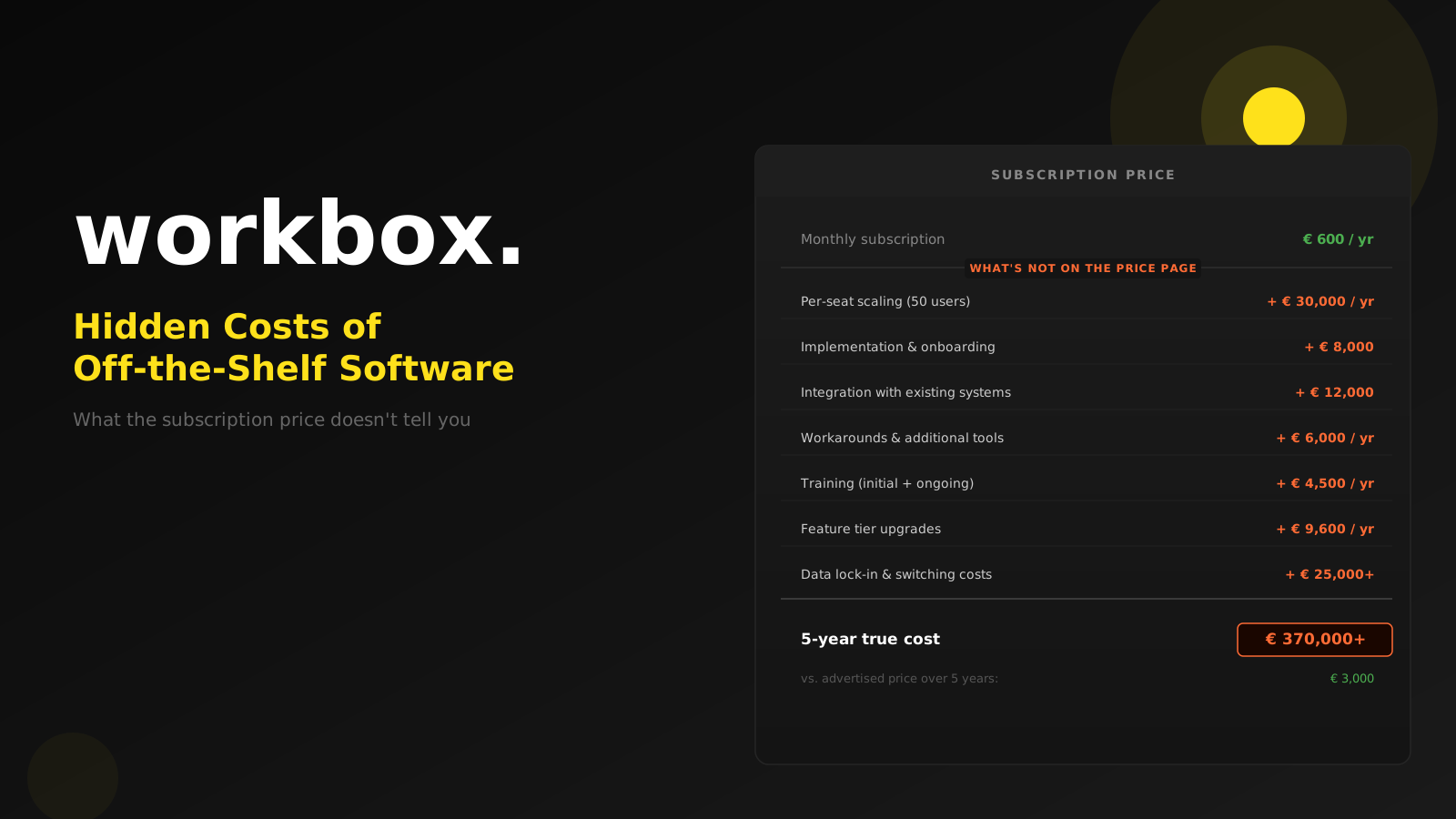
The pricing page looks straightforward. €49 per user per month. A clean feature list. A free trial. No commitment required.
What happens next is familiar to almost every business that has gone through this. You sign up, configure the system, and start bringing your team on board. A few months later, you look at the total spend and realise the €49 was only the beginning.
This is not a criticism of off-the-shelf software — it is often the right choice. But decisions made on the visible price alone are rarely good decisions. This article is about everything that sits below it.
Why the subscription price is not the full picture
Software pricing is designed to be simple at the point of purchase. The complexity tends to reveal itself later.
Here is what rarely appears on the pricing page — but almost always appears on the invoice.
1. Per-seat costs that grow with your team
A subscription at €50 per user per month feels manageable when you have five people using the system. It feels very different when you have fifty.
- Five users: €250/month, €3,000/year
- Twenty users: €1,000/month, €12,000/year
- Fifty users: €2,500/month, €30,000/year
- One hundred users: €5,000/month, €60,000/year
Many businesses sign up with a small pilot team and underestimate how broadly the tool will eventually be used. The natural growth of a business — more staff, more departments, more processes — translates directly into higher software costs.
This is not deceptive. But it means the €50/month you evaluated is not the number you need to model when making a three-year decision.
2. Implementation and onboarding costs
Off-the-shelf software does not arrive configured for your business. Someone has to:
- Set up the account, user roles, and permissions
- Import your existing data and clean it for the new system
- Configure the workflows to match how your team actually works
- Connect the tool to your other systems
- Test that everything works before rolling it out
Many vendors offer implementation services — at an additional cost. Others leave it to you or a third-party partner. Either way, the work takes time and often money.
For larger implementations, professional services costs can easily equal or exceed the first year of subscription fees.
3. Integration work
Your business already uses software. There is probably an accounting system, a CRM, a logistics tool, an e-commerce platform, or an ERP. When you add a new off-the-shelf product, the first question is always: how does this connect to what we already have?
The answer is rarely "automatically and perfectly."
Some integrations exist out of the box — and many of those require a higher-tier subscription to unlock. Others require custom API work, which means developer time and cost. Third-party tools like Zapier or Make can bridge some gaps, but those services have their own costs and often impose data volume limits or processing delays that matter in practice.
Every new piece of software you add to your stack is also a new integration problem. This does not make off-the-shelf software a bad choice — but it is a real cost that is rarely visible when you are evaluating a tool.
4. The gap problem: when the software almost fits
Off-the-shelf products are designed for a broad market. They are built to work reasonably well for many different types of businesses — which means they are built to work perfectly for none of them.
Your business has specific processes. The way you handle approvals, track customer relationships, manage inventory, or report on performance reflects years of experience and deliberate decisions. Generic software was not designed around those specifics.
The gap between what the software does and what your business needs is where the hidden costs live:
- Workarounds. Staff develop habits around the tool's limitations. Someone keeps a separate spreadsheet. Someone exports data to reformat it. These workarounds take time — every day, invisibly.
- Additional tools. When one system cannot do everything, you add another. And another. The stack grows, the costs multiply, and the integrations between them become their own maintenance problem.
- Unused features. You pay for functionality you do not need, while the functionality you do need sits on the vendor's roadmap.
5. Training costs — including the ones you repeat
When you adopt new software, your team needs to learn how to use it. That learning curve has a cost: time spent in training, productivity lost during the adjustment period, and the ongoing support your team needs while they get up to speed.
This is a one-time cost — but only if your team stays the same. In practice, staff turnover means training new employees repeatedly. Every new hire who needs to learn a system is a recurring cost that rarely appears in the original business case.
6. Feature upgrades and tier creep
Software products are sold in tiers. Basic, Professional, Enterprise. The tier you sign up for is almost never the tier you end up on.
Over time, the features you actually need turn out to live in the higher tier. The more advanced reporting. The API access. The custom fields. The priority support. The single sign-on integration required by your IT security policy.
This is not bad faith on the vendor's part — it is how software businesses grow revenue. But it means that the price you started with is rarely the price you stay on.
7. Data lock-in and switching costs
This is the hidden cost that bites hardest — and often goes unnoticed until you want to leave.
After three years of using a system, your business data lives inside it: customer records, transaction history, documents, configurations, audit trails. If you want to move to a different tool — or to a custom-built system — extracting that data and migrating it elsewhere is a significant project.
Some vendors make this easier than others. Many do not. Data exports may be incomplete, in formats that require conversion, or structured in ways that do not map neatly to a new system.
This is not a reason to avoid off-the-shelf software. But it is worth asking, before you sign: how easy is it to get my data out if we need to move? What formats are available? What would a migration actually involve?
What a realistic cost calculation looks like
Before choosing between off-the-shelf software and a custom-built solution, it is worth modelling the five-year total cost of each — not just the initial price.
For off-the-shelf software, that calculation should include:
- Subscription fees at your expected team size in Year 1, Year 3, and Year 5
- Implementation and setup costs
- Integration development or third-party connector costs
- Training time (initial and ongoing, per new hire)
- The cost of workarounds and additional tools needed to fill gaps
- Tier upgrade costs as you need more features
For custom software, the calculation includes the development investment, ongoing maintenance, and infrastructure costs — but also the absence of per-seat scaling, the precise fit to your processes, and the data portability you retain.
The comparison is often closer than it first appears.
When off-the-shelf software is still the right answer
It frequently is. A well-chosen off-the-shelf product with a good fit to your processes is faster to deploy, lower risk, and often the right starting point — especially for standard business functions where generic solutions are genuinely mature.
Accounting software. Standard HR tools. Email marketing platforms. Video conferencing. For these, the off-the-shelf market is competitive, the products are capable, and the cost to build something equivalent would far exceed the cost to buy.
The question to ask is not "build or buy?" as a matter of principle. It is: how well does this specific product fit this specific need, over a realistic time horizon, at the true total cost?
If you are evaluating software options and want to work through the full cost picture before committing, get in touch. We will give you an honest comparison — including when the off-the-shelf option is the better choice.